




Documentation
Webhooks
Receive real-time notifications about:
- Your campaign performance
- Your contact behavior
What is a webhook
A webhook is a powerful tool that enables one system or application to send real-time notifications about a specific event to another system or application.
By configuring EnvíaloSimple webhooks, you can connect them to a public URL (belonging to the target system or application) to which notifications will be sent when a specific event occurs within the tool. For example: a campaign being sent, a contact subscribing, among others.
Configuration in EnvíaloSimple
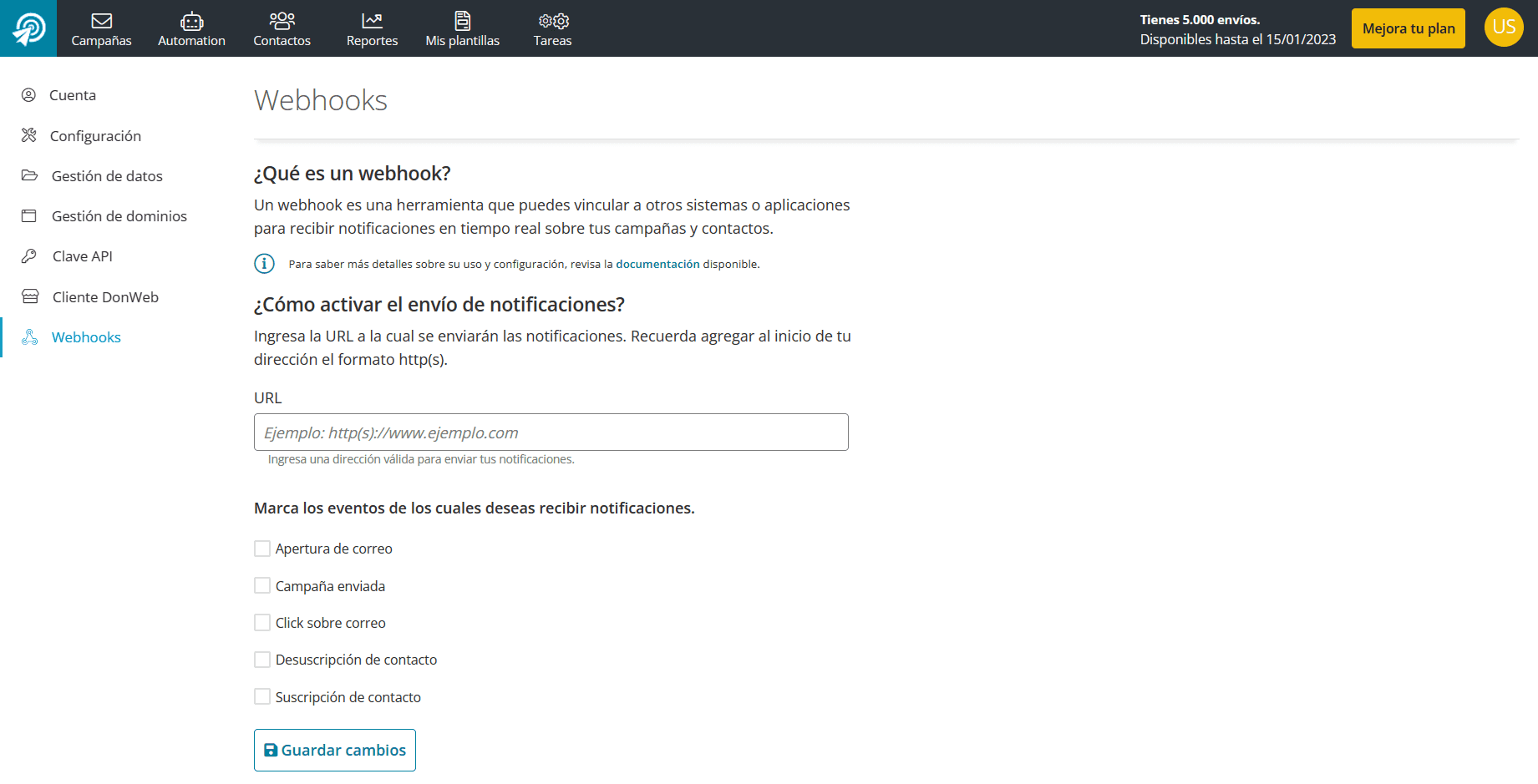
Configuring a webhook is very simple and can be done by following these steps:
- 1) Once you log in to EnvíaloSimple, go to Settings.
- 2) Then, enter the Webhooks section from the side menu.
- 3) There, you will need to copy the URL belonging to the system or application to which it will be integrated. (You must add the http(s) format at the beginning)
- 4) Next, you will see the complete list of available events, where you can select those for which you wish to receive notifications.
- 5) Finally, remember to save the changes.
Event Details
Campaign Open
This notification is sent when a contact opens a campaign. If the same contact opens the same campaign multiple times, only the first open will be notified.
Data returned:
| Name | Description |
|---|---|
| id | Unique event ID. |
| event | Event type: “campaign_read”. |
| Email of the contact who opened the campaign. | |
| ts_event | Date/time of the open. |
| campaign_id | ID of the campaign that was opened. |
| campaign_name | Name of the campaign that was opened. |
| ts_sent | Date/time the opened campaign was sent. |
Example:
{
   id: "39f3abfc43b23e",
   event: "campaign_read",
   email: "contacto@dominio.com",
   ts_event: 1631199366,
   campaign_id: "383",
   campaign_name: "Campaña de Prueba",
   ts_sent: 1631198557,
}
Campaign Sent
A notification is sent after a campaign is successfully delivered.
Data returned:
| Name | Description |
|---|---|
| id | Unique event ID. |
| event | Event type: “campaign_sent”. |
| ts_event | Date/time the campaign was sent. |
| campaign_id | ID of the campaign that was sent. |
| campaign_name | Name of the campaign that was sent. |
Example:
{
   id: "61269d5887e2f",
   event: "campaign_sent",
   ts_event: 1629920600,
   campaign_id: "200",
   campaign_name: "Nombre de la Campaña",
}
Campaign Click
A notification is sent when a contact clicks on any link within the campaign.
Data returned:
| Name | Description |
|---|---|
| id | Unique event ID. |
| event | Event type: “campaign_click”. |
| Email of the contact who clicked in the campaign. | |
| ts_event | Date/time the click occurred. |
| campaign_id | ID of the campaign that was clicked. |
| campaign_name | Name of the campaign that was clicked. |
| ts_sent | Date/time the clicked campaign was sent. |
| campaign_url | Link of the campaign that was clicked. |
Example:
{
   id: "39f3abff06dbcc",
   event: "campaign_click",
   email: "contacto@dominio.com",
   ts_event: 1631199371,
   campaign_id: "383",
   campaign_name: "Campaña de Prueba",
   ts_sent: 1631198557,
   campaign_url: "http://www.google.com?mkt_hm=1&utm_source=email_marketing&utm_admin=123&utm_medium=email&utm_campaign=Prueba_Webhooks",
}
Contact Subscription
A notification is sent when:
- The contact subscribes to one or more lists from forms (the notification is sent upon email confirmation).
- The administrator subscribes the contact by entering the list and adding them.
- The administrator creates an individual contact and assigns them to one or more lists.
Data returned:
| Name | Description |
|---|---|
| id | Unique event ID. |
| event | Event type: “member_subscribe”. |
| ts_event | Date/time of the subscription. |
| Email of the contact who subscribed. | |
| list_ids | IDs of the lists to which the contact subscribed. |
Example:
{
   id: "612cfec2819fb",
   event: "member_subscribe",
   ts_event: 1630338754,
   email: "contacto@dominio.com",
   list_ids: [
      "13",
   ],
}
Contact Unsubscription
A notification is sent when:
- The contact unsubscribes from one or all lists using the link provided in the campaign footer.
- The administrator unsubscribes the contact by entering the list and deleting them.
Data returned:
| Name | Description |
|---|---|
| id | Unique event ID. |
| event | Event type: “member_unsubscribe”. |
| ts_event | Date/time of the unsubscription. |
| reason | Reason for unsubscription. Possible values:
|
| Email of the contact who unsubscribed. | |
| list_ids | IDs of the lists from which the contact unsubscribed. |
| campaign_id | ID of the campaign from which the contact unsubscribed. Only for unsubscription from the campaign link. |
| campaign_name | Name of the campaign from which the contact unsubscribed. Only for unsubscription from the campaign link. |
| ts_sent | Date/time the campaign was sent from which the contact unsubscribed. Only for unsubscription from the campaign link. |
Example:
{
   id: "612d0604472c8",
   event: "member_unsubscribe",
   ts_event: 1630340612,
   reason: "irrelevant",
   email: "contacto@dominio.com",
   list_ids: [
      "5",
   ],
   campaign_id: "201",
   campaign_name: "Campaña de Prueba",
   ts_sent: 1630340179,
}